

Ubuntu部署Docker
注:文中所有指令均使用root身份运行,如使用其他账户指令前需增加sudo 如:sudo apt update
卸载旧版Docker
apt-get remove docker docker-engine docker.io containerd runc
apt-get purge docker-ce docker-ce-cli containerd.io
出现如下提示表示未安装过Docker直接进行下一步

安装依赖项
apt update && apt install apt-transport-https ca-certificates curl software-properties-common gnupg lsb-release添加 Docker GPG 密钥
curl -fsSL https://download.docker.com/linux/ubuntu/gpg | sudo gpg --dearmor -o /usr/share/keyrings/docker-archive-keyring.gpg
添加Docker软件源
echo "deb [arch=$(dpkg --print-architecture) signed-by=/usr/share/keyrings/docker-archive-keyring.gpg] https://mirrors.tuna.tsinghua.edu.cn/docker-ce/linux/ubuntu $(lsb_release -cs) stable" | sudo tee /etc/apt/sources.list.d/docker.list > /dev/null安装Docker
apt update && apt-get install docker-ce docker-ce-cli containerd.io启动 Docker
systemctl start docker
systemctl enable docker
如果启动报错

进入输入以下指令后重新启动
mv /etc/docker/daemon.json /etc/docker/daemon.conf安装docker-compose
Compose 是用于定义和运行多容器 Docker 应用程序的工具。通过 Compose,您可以使用 YML 文件来配置应用程序需要的所有服务。然后,使用一个命令,就可以从 YML 文件配置中创建并启动所有服务。
如果你还不了解 YML 文件配置,可以先阅读 YAML 入门教程 | 菜鸟教程。
Compose 使用的三个步骤:
使用 Dockerfile 定义应用程序的环境。
使用 docker-compose.yml 定义构成应用程序的服务,这样它们可以在隔离环境中一起运行。
最后,执行 docker-compose up 命令来启动并运行整个应用程序。
apt install docker-composeDocker常用命令
systemctl start docker     #运行Docker守护进程
systemctl stop docker      #停止Docker守护进程
systemctl restart docker   #重启Docker守护进程
systemctl enable docker    #设置Docker开机自启动
systemctl status docker    #查看Docker的运行状态

docker ps #查看当前容器
docker kill 容器id #停止指定容器
docker rm 容器id #删除容器
毫秒镜像一键配置脚本
bash -c "$(curl -sSL https://n3.ink/helper)"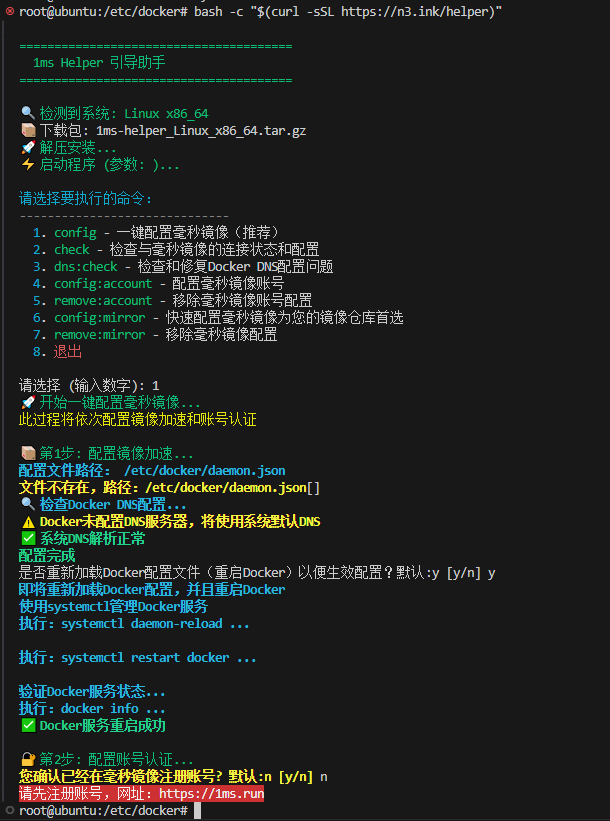
安装加速一条龙脚本
bash <(curl -f -s --connect-timeout 10 --retry 3 https://linuxmirrors.cn/docker.sh) --source mirrors.tencent.com/docker-ce --source-registry docker.1ms.run --protocol https --install-latested true --close-firewall false --ignore-backup-tips
本文是原创文章,采用 CC BY-NC-ND 4.0 协议,完整转载请注明来自 程序员小航
阅读建议


评论
匿名评论
隐私政策
你无需删除空行,直接评论以获取最佳展示效果